Articles

Malaysian Food Delivery Platforms

Top 5 Malaysian Food Delivery Platforms: 2026 Business Guide

Picture this: You’re a busy nasi lemak stall owner in KL, staring at another 30% commission bite from your Malaysian food delivery platform. Customers love the convenience, but those fees eat your margins alive. The Malaysian food service industry, including Malaysian food delivery platforms, is expected to grow from USD 16.67 billion in 2026 to USD 30.74 billion in 5 years, powering a market worth billions as SMEs fight to thrive. Key Points: GrabFood dominates with 67% share, followed by Foodpanda at 22% and ShopeeFood at 11%. Key Point: Platforms matter because they drive 55% regional orders, but high commissions (15-35%) squeeze profits—owners switch to hybrids for survival. Furthermore, SMEs in Klang Valley crave Grab alternatives in Malaysia to cut costs. On the other hand, tech-savvy startups eye restaurant delivery management software for full control. Platform 1: GrabFood Leads the Pack Let’s begin by addressing the elephant in the room. GrabFood blankets KL with seamless integration to rides and rewards. Riders swarm peak hours, slashing wait times to 30 minutes in traffic jams. You pay RM2.50–RM7 delivery fees plus 5-9% service, but commissions hit 30%+. Consequently, many owners feel trapped. Key Point: How GrabFood wins? Its ecosystem loyalty keeps users hooked, but diversify to avoid dependency. Platform 2: Foodpanda Delivers Reliability Foodpanda shines with grocery add-ons and a massive rider fleet. It covers urban spots fast, ideal for diverse menus like roti canai or bubble tea. Fees mirror Grab’s, around RM2.50–RM7, with 15-30% commissions varying by deal. Similarly, promotions lure diners, but restaurants negotiate for lower cuts.​ Platform 3: ShopeeFood as Grab Alternative ShopeeFood emerges as a top Grab alternative in Malaysia, tapping e-commerce crowds for RM2–RM6 fees. It packs deals that pull budget eaters.​ Commissions stay at 5-9%, but the real draw? Seamless app flow boosts repeat orders. Key Point: Why choose ShopeeFood? It slashes costs via promotions, helping SMEs compete without Grab’s grip.​ Platform 4: Beep Cuts Commissions Beep, from StoreHub, targets independents with lower fees—no marketplace gouge. Restaurants keep more by direct ordering. It spans Klang Valley, promising upfront pricing. On the other hand, smaller scale means fewer riders than giants. Platform 5: FoodVillage Goes Commission-Free FoodVillage revolutionizes with commission-free food delivery on top-tier plans, helping business owners cap operational costs and scale freely—while lower tiers charge just RM99 monthly with minimal commissions. It integrates Lalamove for automated, accurate routes via Google Maps. Owners set their rates, dodging 30% traps entirely on premium options. Key Point: How does commission-free work? Top tiers eliminate fees for full profit control; even entry plans at RM99/mo + low commission beat industry averages, powering real scalability. Explore our article on the power of integrating Facebook pixel in your FoodVillage store. Frequently Asked Questions:
Read More »
F&B ordering system

The 6 Benefits Of An F&B Ordering System

Quick Summary (TL;DR): Implementing an F&B ordering system allows restaurants to scale efficiently by digitizing the sales process. The 6 primary benefits include: Discover how FoodVillage transforms traditional dining into a high-performance digital operation below. If you own or manage a restaurant, you are aware of the importance of delivering excellent customer service to the success of your enterprise. An F&B ordering system may be used to improve that experience. This technology not only makes it easy for guests to order food and drinks, but it also has several advantages for you as a restaurant owner. The following are some major benefits of usingthe FoodVillage F&B ordering system: 1. Faster Service: Customers may place orders more correctly and quickly with the help of an F&B ordering system. Customers will wait less for their food as a result, which might improve their whole experience. 2. Increased Efficiency An F&B ordering system may also make running your business more effective. Your team may concentrate on other duties like cooking, serving clients, and cleaning with fewer manual operations. 3. Greater Accuracy Manual order taking can frequently result in misunderstandings. Less room for error exists with a F&B ordering system, improving order accuracy and lowering the frequency of complaints and returns. 4. Options for Customization A lot of food and beverage ordering platforms let consumers add certain toppings, sauces, or ingredients to their orders. Increased client satisfaction and loyalty may result from this. 5. Data Insights An F&B ordering system may also give you useful data insights, such as the most well-liked menu items, the busiest shopping hours, and the most successful promos. You may use this information to guide your menu planning, personnel selections, and marketing choices. 6. Smooth Integration Kitchen display systems and inventory management systems are just a few examples of additional technologies that F&B ordering systems may interact with. This makes the process more smooth and can cut down on the time and labour needed to run your business. Implementing FoodVillage’s F&B ordering system will give various benefits to restaurateurs. You may improve the customer experience and streamline your operations with the use of this technology, which can also help you increase productivity, efficiency, accuracy and data insights. An F&B ordering system is certainly something to think about if you want to boost the performance of your restaurant. Are you ready to take your restaurant to the next level with an F&B ordering system? Contact us now to sign up and begin experiencing the advantages. Don’t pass up the chance to streamline business processes, improve customer experience and boost efficiency. We are ready to assist you in taking the initial step towards revolutionising your business. To find out more, please contact us right now.

Read More »
Restaurant Sales Conversions

How Using Large Photos Can Optimise Restaurant Sales Conversions!

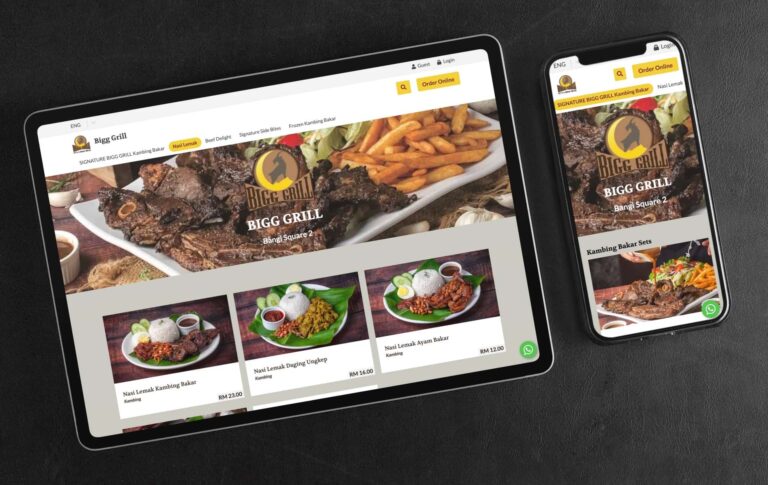
Most online food ordering platforms rely on small and eye-squinting images that don’t do justice to the food being sold. This lack of engaging visuals is a significant reason why visitors often leave those sites without making a purchase, ultimately impacting restaurant sales conversions. If you cannot visually captivate visitors in a few seconds, you have lost them and the ROI on your ad spend. At FoodVillage, we understand the importance of stunning food photography in converting visitors into customers. That’s why we offer an option to display your food photos in a large format that will truly engage your visitors and make them want to buy. In fact, studies have shown that captivating visuals are a critical component in optimising online sales conversions. So whatever digital device a customer uses, you can be assured that they will be presented with a large image format that truly represents the best possible culinary visual experience that can trigger the response you’d like from your customers. Even if they are not ready to buy, you have already left a lasting impression that would cause them to share that experience or bookmark it so that they can make the purchase another time. Here are several advantages to using large images in restaurant digital menus: 1. Improved Visual Appeal Large images can make a restaurant’s digital menu more visually appealing and attractive to customers. When customers are deciding what to order, they often rely on visual cues to help them make their decision. Large, high-quality images of menu items can help customers visualize what they will be eating and may encourage them to try something new. 2. Easier To See By using large images, restaurants can make it easier for customers to see the details of their menu items and make informed decisions about what to order. Large images can be easier for customers with visual impairments or for those using small screens on their phones. 3. Enhanced Marketing Large images can be used as a marketing tool to showcase a restaurant’s most popular or unique menu items. By highlighting these items with large, eye-catching images, restaurants can draw attention to them and encourage customers to try them. 4. Improved Customer Experience Using large images in a digital menu can improve the overall customer experience by making it easier for customers to browse and order from the menu. When customers have a positive experience with a restaurant’s digital menu, they are more likely to return and recommend the restaurant to others. 5. Increased efficiency Large images can also help to increase efficiency in the ordering process. By using images to clearly display menu items and prices, restaurants can reduce the time it takes for customers to make their selections and place their orders. This can help to reduce wait times and improve the overall efficiency of the restaurant. Here is another example of a client who is capitalising on powerful imagery to convert visitors into paying customers: Contact us today and let us show you how you can get started selling online as quickly as a day. We’ll even provide a free consultation to discuss the best way to showcase your food photos on your web store using our platform.

Read More »
FoodVillage's Free Item Promotion Feature

Drive Sales With FoodVillage’s Free Item Promotion

FoodVillage has launched a new free item promotion feature that can boost the sales of your food and beverage business by rewarding customers who spend more or purchase a certain item. In the second part of this article, you will learn practical ways you can leverage on this promotion feature to derive the actions you would like from your customers when they shop from your store. 1. Determine What Are The Giveaways Start by determining what your giveaways are. You can either select one or more items. For example, you can present 4 free items and the customer can select 2 out of the 4 as seen in the image below. 2. Set The Conditions For The Free Item Promotion Here are the preset conditions where the free item promotion can be triggered: 3. Turn The Promotion To Trigger Automatically Or Manually The free item promotion can be triggered or activated manually with a coupon code or automatically when the customer has met the requirements of the offer. 4. Setting Promotion Limitations The free item promotion can be limited by the following parameters: Ideas On How To Drive Sales With Free Item Promotions Rewarding customers with free items when they spend more or buy a certain promotional item can be very powerful. The promotion is really limited to your imagination, so here are options to get you going. 1. Drive Sales During Low Traffic Times During The Day Reward customers with a free drink when they order a meal between lunch and dinner. 2. Drive Sales For A Festival Season Ahead Of Time For example, reward customers who order ahead of time for Christmas by giving free items for orders made for higher ticket items such as Roast Lamb. For that specific Christmas menu, set the lead time to 14 days. Promotions such as this allow you time to plan and buy ahead to deliver on those orders. This will also remove the risk of buying stock before receiving any paid orders. 3. Receive Customer Data With A Member’s Only Promotion Drive up your memberships with a members-only promotion. 4. Push Sales For A New Launch Drive attention to a new launch such as: Don’t miss out on this amazing opportunity to boost your food and beverage business sales with FoodVillage’s powerful and versatile free item promotion feature. Contact us or chat with us today to learn more about this feature or to sign up for your own branded online food ordering system.

Read More »
Facebook Pixel Helps Restaurants

How Facebook Pixel Helps Restaurants Succeed Online

As a restaurateur, engaging with potential and current customers on Facebook is essential to your success. Did you know Facebook Pixel helps restaurants? You can use Facebook pixel to measure how well your ads are working and make sure you’re targeting the right people. Pixel is a code snippet that you add to your website. When someone visits your website, pixel fires and sends information about the visit back to Facebook. This helps us show you relevant ads for people who have visited your website. For example, if you’ve installed the pixel on your website and someone visits it after. What is Facebook Pixel? Facebook Pixel is an analytics tool that lets you measure the effectiveness of your Facebook ads. When someone visits your website after clicking on one of your Facebook ads, Facebook Pixel helps you understand what happened. For example, did that person buy something from your website? Pixel also helps you find people who have visited your website before and show them an ad for something they may have missed on their first visit. This way, you can reach more people who are actually interested in your brand or your type of food. This means you can target customers who have also shown interest in other brands that serve similar food as you do. How is Facebook Pixel Useful For Ecommerce Stores? For ecommerce websites, the Facebook pixel can be particularly useful in a number of ways: 1. Retargeting The pixel can track which products or pages people visit on your website, and then show them targeted ads as they browse Facebook. This can help bring people back to your site and encourage them to make a purchase. 2. Audience Building The pixel can help you build custom audiences based on the actions people take on your website. For example, you could create an audience of people who have visited a specific product page but have not made a purchase. You can then show them targeted ads to encourage them to complete the purchase. 3. Conversion Tracking The pixel can help you track conversions, or the actions people take on your website that you consider to be valuable (such as making a purchase or filling out a form). This can help you understand which marketing efforts are most effective at driving conversions. Facebook pixel can be a valuable tool for ecommerce websites as it can help you better understand your customers, improve your marketing efforts, and track the success of your campaigns. Unlike many other food ordering platforms, FoodVillage makes a provision for Facebook Pixel to be embedded into your restaurant web store. Contact us to find out more or to start a store within a day.

Read More »
Restaurant Data Analytics

How To Benefit From Detailed Restaurant Data Analytics

The FoodVillage food & beverage ordering platform collects very useful and detailed restaurant data analytics that will help you understand your customers and the success of a sales campaign that you may be running. 1. Viewing Sales Data By Date Ranges One very useful feature you will find is the ability to view your sales data analytics by date ranges. You can view them by year, month, week and day. The data is then displayed by revenue or number of sales and broken down into granular time segments. This data will help you understand your sales trend and customer shopping behaviour. Along with that, you will also be able to view the following data based on the date range you select: 2. Payment Methods Depending on the number of payment methods you use, you will see the breakdown of each payment method in total value and frequency of use. The payment gateways that you can use with our system include Paypal, Stripe, iPay88 and GKash. 3. Order Types There are three order types (Pickups, Deliveries and Dine-Ins) that would be displayed with the corresponding value and number of sales. The order types will help you understand what services are popular with your customers or the services that you should promote. 4. Order Status Store managers will love how easy it is to view the status of all orders at a glance from the order dashboard. FoodVillage automatically updates the status of each order in an organised fashion. From unconfirmed, to confirmed or confirmed (up-coming), to ready, to on route (for deliveries) and finally completed orders. There is also a section for cancelled orders. A store manager or the owner can access this is the order fulfilment control centre and receive an immediate reflection of how well your team is able to process and fulfil orders. 5. Item & Category Counts Item Counts display the total number of orders made for a particular dish. This information helps you to understand what are the top-selling products that you are offering. Category Counts as the name suggests present the top-performing categories. Example: you may have many types of noodles but one category for noodles. So even though you may have top selling products that are not noodles, but collectively as a category, noodles may be the top-performing category. 6. Taxes If you have activated the sales tax feature on our platform, you will be able to view the following data in this section: 7. Downloadable Data You can download Every order item in CSV format with the ability to customise what data you wish in each download. Your staff can download a total of 32 data points per order. Here are some not already mentioned above: When it comes to e-commerce, sales data analytics is key to success. You need to know who your customers are, what they’re buying, when they are buying, and more in order to make decisions about pricing, inventory, marketing, and beyond. Thankfully, you can easily analyze your web store’s data with the sales data already provided on our platform. If this isn’t sufficient for you, you will be glad to know that our system can include Google Analytics and Facebook Pixel. Contact us to find out more or to register an account today.

Read More »
grow sales with responsive websites

2 Reasons How Responsive Websites Help To Grow Sales

What Are Responsive Websites? Responsive websites are sites that respond to the size of the device it is being viewed on. This can be a laptop, desktop computer, tablet, or smartphone. You can lose customers when a bad shopping experience is presented. Conversely, you can grow sales with responsive websites as a responsive website will change the layout, text size, and images to fit the screen size of the device it is being viewed on. In a nutshell, you want to present the best possible shopping experience that keeps a visitor shopping and compels them to act. Having a responsive website design is important because visitors are viewing websites on all different types of devices. The last thing any restauranteur wants to see is when a customer has to scroll left and right and zooming in and out to see all the content It’s no secret that a good user experience (UX) is essential for any website or app. After all, if users don’t enjoy using an ordering platform, they’re not going to stick around for long. That’s why we made it critical that our FoodVillage ordering platform is responsive and looks great on all devices, from phones and tablets to laptops and PCs. In this article, we’ll discuss how you can grow sales with responsive websites. We will also throw in some tips for creating a great user experience. 1. Optimised User Experience Your customers shouldn’t have to work so hard to shop on your web store. Here are some ways you can stop losing customers if they have a bad user experience when a website is not responsive: It’s easy to find the food they are looking for Hungry customers can be ‘hangry’ and impatient and if they have to go through an obstacle course shopping experience to simply look or select what they want, they’re going to drop off your store very quickly. You only get one chance to leave a first impression. Never present a mobile user experience on tablets and desktop devices Even though 62% of Malaysians in 2021 use their mobile phones to shop, don’t miss out on the 38% who still use tablets and desktops/laptops to shop online. Reason? You can still view more information at one time on a larger screen than on a mobile platform. Only about 25% of a desktop screen is occupied if a mobile experience is presented on it. Constant scrolling up and down to view all products Scrolling up and down through a menu should be reduced as much as possible, especially on a tablet and desktop platform. A responsive website reduces this significantly, from displaying 1 product per row to 2 or 3 in a row. 2. Engaging & Captivating Product Images In the online world, the only way a visitor can ‘taste’ your food is with their eyes. Until technology is able to catch up to transfer the sense of smell and taste digitally, the only means to convert visitors to customers is through their eyes. Here’s how you can achieve this: Invest in stunning food photography A picture does paint a thousand words. The key to conversions is when a customer exchanges money for value. When you are able to increase the perceived value of a given product, customers will have no hesitation to buy from you. We are not condoning the use of trickery, all we are saying is that your food images should look as good as it tastes. Compelling food photography is truly an investment, as one product photo will continually sell for you for months or years. Conversely, having bad photos could be the very reason why you are not enjoying the sales you would like to have. Images are large and have a high resolution Ever tried buying a product when the images are the size of a small app icon on your phone? So small in fact, you don’t really know what you’re getting. Even worse when all you see is a catalogue of small images of food. Conversely, visit any fast food restaurant’s web store and you’ll notice one thing, food images are sharp, large and even mouth-watering. This is the reason why we provide the option for our clients to present sufficiently large food images on our food ordering platform and on a mobile, the size is from edge to edge.

Read More »
Discount coupon features

Customisable Discount Coupon Features That Drive Sales

FoodVillage is the perfect platform to not only drive sales and increase revenue with discount coupons but they can also be customized to fit the requirements of your restaurant business. In this article, you will learn the top discount coupon features that will help you acquire new customers and increase sales from existing customers. 1. Free Delivery Threshold One of the best ways to drive sales is to offer free delivery. With the commissions saved with FoodVillage, you will have sufficient margins to drive such an offer. Besides, as a restauranteur, you are the one that determines how much a customer spends before a customer receives that reward. FoodVillage allows restauranteurs to set the delivery range of every single outlet at any time to control the cost implications of the free delivery offer. 2. Members-Only Discounts Coupons Give reason for your customers to keep coming back and turn regular customers into loyal ones with a members-only discount. Set your discounts to only work for customers that log in during the purchase. 3. Open or Time-Bound Discounts Coupons Set discount codes to start and end at a given date and time. You can do so in advance, which helps for example, if a promo starts at midnight. If a discount code is set without date parameters, then the discount will be effective until it is deactivated. 4. Discount Codes By Percentage or Value FoodVillage provides the option to set discounts by percentage or a fixed price. Store managers can set this in combination with other parameters such as minimum spend, or designation to a dish or order type. 5. Order Type Discounts Coupons Designate discounts to a single or multiple order types, such as pickups, deliveries or dine-ins. Get even more granular by setting it to now orders, order later or both. This discount type can be used to promote a certain order type to encourage more now deliveries for example. 6. Payment Methods Discounts Coupons If you have multiple payment options, you can choose to provide discounts to a certain payment type you prefer. Restauranteurs can encourage customers to pay by cash by giving dine-in customers a special discount for paying in cash or via QR. 7. Setting Limitations To Discounts Coupons If you wish to drive sales with discounts but desire to control the number of redemptions per person to one, simply turn on the Single Redemption option. Allowing only logged-in customers adds another layer of limitation to prevent abuse of a particular discount code. The advantage of driving a members-only discount promotion encourages customers to provide their data such as their name, email, mobile and delivery address. 8. Auto-Triggered Coupon-Free Discounts Coupons Entering discount coupons can be a hassle sometimes, from typing difficult coupon codes to not recalling the discount code. With FoodVillage discount codes, you can switch on the option to automatically trigger discount codes depending on the customer behaviour you wish to receive. Here are some customer shopping behaviours you can reward with this feature to trigger discounts: The FoodVillage food and beverage ordering platform empowers restaurant owners to run their sales and marketing promotions with a wide range of discount coupon features. This in turn presents a wide option to customise discount promotions the way restauranteurs want it and when they want it. Contact us to find out more or to start an account today. Image credits: Photo by Thirdman from Pexels

Read More »
Restaurant digital menu

10 Amazing Benefits Of Using Digital Menus For Restaurants

In today’s digital age, customers expect to be able to order food from their smartphones with the touch of a button. A digital menu can help your restaurant keep up with the latest trends and satisfy your customers’ desires. With our digital menus, you can customize your orders according to each customer’s preference, and say goodbye to human errors!  We personally witnessed the benefits of digital menus in one of our client’s outlets. In this situation, it was a lunch crowd with patrons occupying eight tables and simultaneously deciding what to order. At one of those tables, eleven patrons who had just walked in, scanned the table-specific QR code to place their orders within a short space of time. No waiter was in sight nor were they needed. Within a minute or two, order after order came scrolling out of the merchant’s thermal printer. Here are the benefits we noticed from this experience: 1. Digital Menus Improves Service Speed With digital menus, customers can place their orders immediately. There was no need to flag a waiter for service which can be an absolute nightmare during peak hours or there is a non-observant waiter, not forgetting as well when patrons are seated in an obscure location in the restaurant. Customers can choose to place paid orders ahead of time so they are ready to eat the moment they are seated. 2. Serve More Customers When customers are served faster, you will be able to serve more customers with the same amount of dining space. Reduce the number of times you turn away customers because you could no longer accommodate them. 3. Digital Menus Eliminate Human Error We are all too familiar with waiters getting our orders wrong. With digital menus, the customer is the one that is placing the order and each order is printed. Reference can be made to the printout if the accuracy of the order is in question. Another common sight at restaurants is a waiter with his hands full with orders scrambling up and down between tables wondering who placed the order. 4. Swift Menu Changes Ever tried after taking some time deciding on an order only to find out when you finally get the attention of a waiter that the item is not available? We all know how inconvenient that is. With a digital menu, menu managers can hide or place items out of stock with a simple few clicks. Changes to the menu can be made quickly and reflected on the front end. This includes changes in prices or adding and removing items. Try doing this at the same speed and cost with printed menus. 5. Personalised Service With digital menus, waiters will not only know what is ordered and which table the order came from but the customer’s name. Imagine how special a customer would feel if they received their order while being addressed by name. Should this feature not fit into your business model, simply turn off the option to capture customers’ info for dine-in orders. The image on the right is a glimpse of the order dashboard of our system with a summary of the actual order received from the eleven patrons. Order managers can click on any order and view the order details, create another order printout if needed and move orders to the completed order status when a customer has finally paid. 6. Order History For Easy Reordering Customers who log in when they order will find an order history whenever they order and they can reorder the same order with a few simple clicks. 7. Capturing Data Analytics Many restaurants are still driving their businesses blind, with the FoodVillage digital dine-in menu every single order is captured and displayed beautifully to empower you to understand customer behaviour. From the top-selling products, the payment type, peak hours, customer’s total spend and the number of orders and much more. Learn more from our article: How You Can Benefit From FoodVillage’s Detailed Sales Data Analytics 8. Waiters Are Freed Up To Focus On Order Fulfilment With digital menus, say goodbye to the time it takes to jot down an order. The time saved can be used to focus on the delivery of orders. This also means cost savings from the additional staff that won’t be required during peak hours or seasons. It’s no wonder in Japan, restaurants can operate without any waiters. Worried about upsells without a waiter? Structure the upsells right into your menu so you are guaranteed that customers are receiving upsells every single time. Customers get a better deal and you increase your revenues! 9. Immediate And Designated Order Printouts Every single order if you so choose get printed and with specific dishes printed to designated stations. For example, drink orders would be sent with only printouts of drinks sent to the drink station while the complete order is sent to the front of house. 10. A Better System While Lowering Cost With FoodVillage’s digital menus, the cost savings are obvious. For a fraction of the cost of hiring one waiter, you will now have a virtual waiter at every single table that is ready ALL the time, makes no errors, collects payments, upsells customers, registers customer data, records order data for analytics, prints out orders while organising each order systematically, doesn’t get tired nor complains and doesn’t ask for a raise. But wait, it gets even better! We have only addressed the dine-in benefits. With no additional cost, you get pickups, deliveries and table reservations on one platform! It’s no wonder why McDonald’s now uses digital menus as well as table QR ordering. Other fast-food joints have taken notice and are already jumping on the bandwagon. Times have changed, don’t get left behind. Better yet, you don’t have to spend millions on hardware and software with FoodVillage. Eliminate the number of lost customers who avoided eating at your restaurant just because another restaurant could process their orders much faster. Imagine what a simple change could do to your

Read More »

The Top 10 FoodVillage Features That Automates & Boosts A Restaurant’s Food Deliveries

Expanding your restaurant business with delivery can be easy with our user-friendly food ordering platform. From ordering to delivery, FoodVillage takes the hassle out of running a restaurant online. With our easy-to-use platform, you can focus on what you do best: cooking great food. Here are the top 10 delivery features that automate the operations and growth of your business (the reason that they are the top 10 is that there are more not mentioned here for brevity): 1. Determine Your Own Delivery Range & Max Driving Time The FoodVillage platform empowers restauranteurs with the ability to set how their business should run. And you can set that delivery range and max delivery driving time specific to each outlet. Accommodating changes in traffic conditions attributed to peak hours or weather conditions: With Google Maps integration, estimated delivery time is aggregated from live traffic information to provide accurate delivery times. This means you will have the ability to prevent orders that may take too long to deliver even though the customer is within your delivery range. This is especially useful when the freshness of your food on arrival is critical. 2. Determine Your Own Delivery Charges There is virtually no limitation to how you can set your delivery charges. You can either use a formula or charge customers per kilometre distance. 3. Determine Your Own Delivery Times The FoodVillage system can accommodate to the timing that is suitable for your business. 4. Determine Your Own Delivery Time Intervals The service time intervals for all our services: pickups, deliveries, dine-ins and reservations, can be set individually by the minute to suit your requirements. Examples: 60 minute intervals: 12pm, 1pm, 2pm, etc.30 minute intervals: 12:00pm, 12:30pm, 1:00pm, etc.5 minutes intervals: 12:00pm, 12:05pm, 12:10pm, etc. 5. Block Out Specific Delivery Times One of our clients during a festive season was able to block delivery services for specific hours of a day due to the surge of orders they received during that time. This allowed them to stay operational knowing that there would be a surge of orders without the fear of disappointing customers if they received every single order for that given timeslot. This meant that customers could continue to place their orders but had to adjust when they would receive their orders. 6. Block Out Delivery Destinations By Keywords Or Designate Delivery Zones You are able to block certain delivery locations based on keywords or designate delivery zones. 7. Order Surge Protection With a simple formula, you can prevent too many orders at a given time should they occur. With the parameter that you determine, the set number of minutes would be added to the wait time if a certain threshold of orders is received. In other words, for every X outstanding order/s, increase the estimated wait time by Y minutes. This means you can continue receiving orders without the concern of not being able to fulfil them. You can set this to apply specifically to delivery orders only or to all order types, such as pickups and dine-ins. 8. Automated Food Delivery Arrangement FoodVillage is fully integrated with Lalamove and automates the delivery arrangement whether they are instant orders or delivery for future orders. You are not obligated to use Lalamove if you do not want to nor are you bound to use them after Lalamove integration. Lalamove is constantly expanding its services throughout Malaysia. They are currently available in these locations:  The FoodVillage platform works wherever there’s Google Maps – which is practically anywhere! Our integration with Lalamove allows us to expand our automated delivery services wherever Lalamove services are available. Besides Malaysia, Lalamove services are currently available in Brazil, Hong Kong, Indonesia, Mexico, Philippines, Singapore, Taiwan, Thailand, United States and Vietnam. The FoodVillage food ordering platform is fully integrated with delivery partner Lalamove, so you can be sure that your orders will be taken care of quickly and efficiently. Plus, there are no extra charges for delivery from the delivery charges quoted by Lalamove. 9. Detailed Delivery Status At Your Fingertips One of the biggest concerns restaurant delivery managers have in order fulfilment is the hassle they have to go through to know the status of a given delivery. From delivery pickup triggering, confirmation, a rider’s location, name and contact information. Our integration with Lalamove provides all the information you need when you need it at a click of a button. 10. Free Delivery Thresholds Automatically reward customers with free delivery who spend beyond your desired currency value. Contact us to try FoodVillage today and see how easy it is to get your food delivered right to your customers’ doorsteps or learn more about our delivery integration with Lalamove.

Read More »
Need Help?