Articles

Restaurant Sales Conversions

How Using Large Photos Can Optimise Restaurant Sales Conversions!

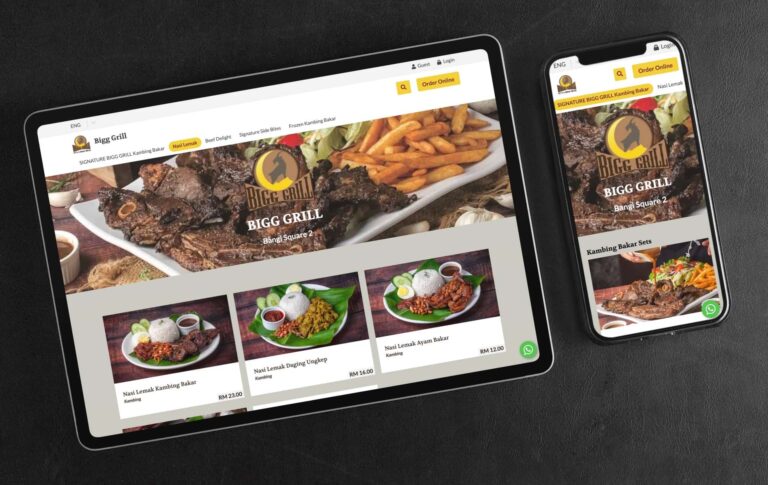
Most online food ordering platforms rely on small and eye-squinting images that don’t do justice to the food being sold. This lack of engaging visuals is a significant reason why visitors often leave those sites without making a purchase, ultimately impacting restaurant sales conversions. If you cannot visually captivate visitors in a few seconds, you have lost them and the ROI on your ad spend. At FoodVillage, we understand the importance of stunning food photography in converting visitors into customers. That’s why we offer an option to display your food photos in a large format that will truly engage your visitors and make them want to buy. In fact, studies have shown that captivating visuals are a critical component in optimising online sales conversions. So whatever digital device a customer uses, you can be assured that they will be presented with a large image format that truly represents the best possible culinary visual experience that can trigger the response you’d like from your customers. Even if they are not ready to buy, you have already left a lasting impression that would cause them to share that experience or bookmark it so that they can make the purchase another time. Here are several advantages to using large images in restaurant digital menus: 1. Improved Visual Appeal Large images can make a restaurant’s digital menu more visually appealing and attractive to customers. When customers are deciding what to order, they often rely on visual cues to help them make their decision. Large, high-quality images of menu items can help customers visualize what they will be eating and may encourage them to try something new. 2. Easier To See By using large images, restaurants can make it easier for customers to see the details of their menu items and make informed decisions about what to order. Large images can be easier for customers with visual impairments or for those using small screens on their phones. 3. Enhanced Marketing Large images can be used as a marketing tool to showcase a restaurant’s most popular or unique menu items. By highlighting these items with large, eye-catching images, restaurants can draw attention to them and encourage customers to try them. 4. Improved Customer Experience Using large images in a digital menu can improve the overall customer experience by making it easier for customers to browse and order from the menu. When customers have a positive experience with a restaurant’s digital menu, they are more likely to return and recommend the restaurant to others. 5. Increased efficiency Large images can also help to increase efficiency in the ordering process. By using images to clearly display menu items and prices, restaurants can reduce the time it takes for customers to make their selections and place their orders. This can help to reduce wait times and improve the overall efficiency of the restaurant. Here is another example of a client who is capitalising on powerful imagery to convert visitors into paying customers: Contact us today and let us show you how you can get started selling online as quickly as a day. We’ll even provide a free consultation to discuss the best way to showcase your food photos on your web store using our platform.

Read More »
Restaurant Data Analytics

How To Benefit From Detailed Restaurant Data Analytics

The FoodVillage food & beverage ordering platform collects very useful and detailed restaurant data analytics that will help you understand your customers and the success of a sales campaign that you may be running. 1. Viewing Sales Data By Date Ranges One very useful feature you will find is the ability to view your sales data analytics by date ranges. You can view them by year, month, week and day. The data is then displayed by revenue or number of sales and broken down into granular time segments. This data will help you understand your sales trend and customer shopping behaviour. Along with that, you will also be able to view the following data based on the date range you select: 2. Payment Methods Depending on the number of payment methods you use, you will see the breakdown of each payment method in total value and frequency of use. The payment gateways that you can use with our system include Paypal, Stripe, iPay88 and GKash. 3. Order Types There are three order types (Pickups, Deliveries and Dine-Ins) that would be displayed with the corresponding value and number of sales. The order types will help you understand what services are popular with your customers or the services that you should promote. 4. Order Status Store managers will love how easy it is to view the status of all orders at a glance from the order dashboard. FoodVillage automatically updates the status of each order in an organised fashion. From unconfirmed, to confirmed or confirmed (up-coming), to ready, to on route (for deliveries) and finally completed orders. There is also a section for cancelled orders. A store manager or the owner can access this is the order fulfilment control centre and receive an immediate reflection of how well your team is able to process and fulfil orders. 5. Item & Category Counts Item Counts display the total number of orders made for a particular dish. This information helps you to understand what are the top-selling products that you are offering. Category Counts as the name suggests present the top-performing categories. Example: you may have many types of noodles but one category for noodles. So even though you may have top selling products that are not noodles, but collectively as a category, noodles may be the top-performing category. 6. Taxes If you have activated the sales tax feature on our platform, you will be able to view the following data in this section: 7. Downloadable Data You can download Every order item in CSV format with the ability to customise what data you wish in each download. Your staff can download a total of 32 data points per order. Here are some not already mentioned above: When it comes to e-commerce, sales data analytics is key to success. You need to know who your customers are, what they’re buying, when they are buying, and more in order to make decisions about pricing, inventory, marketing, and beyond. Thankfully, you can easily analyze your web store’s data with the sales data already provided on our platform. If this isn’t sufficient for you, you will be glad to know that our system can include Google Analytics and Facebook Pixel. Contact us to find out more or to register an account today.

Read More »
grow sales with responsive websites

2 Reasons How Responsive Websites Help To Grow Sales

What Are Responsive Websites? Responsive websites are sites that respond to the size of the device it is being viewed on. This can be a laptop, desktop computer, tablet, or smartphone. You can lose customers when a bad shopping experience is presented. Conversely, you can grow sales with responsive websites as a responsive website will change the layout, text size, and images to fit the screen size of the device it is being viewed on. In a nutshell, you want to present the best possible shopping experience that keeps a visitor shopping and compels them to act. Having a responsive website design is important because visitors are viewing websites on all different types of devices. The last thing any restauranteur wants to see is when a customer has to scroll left and right and zooming in and out to see all the content It’s no secret that a good user experience (UX) is essential for any website or app. After all, if users don’t enjoy using an ordering platform, they’re not going to stick around for long. That’s why we made it critical that our FoodVillage ordering platform is responsive and looks great on all devices, from phones and tablets to laptops and PCs. In this article, we’ll discuss how you can grow sales with responsive websites. We will also throw in some tips for creating a great user experience. 1. Optimised User Experience Your customers shouldn’t have to work so hard to shop on your web store. Here are some ways you can stop losing customers if they have a bad user experience when a website is not responsive: It’s easy to find the food they are looking for Hungry customers can be ‘hangry’ and impatient and if they have to go through an obstacle course shopping experience to simply look or select what they want, they’re going to drop off your store very quickly. You only get one chance to leave a first impression. Never present a mobile user experience on tablets and desktop devices Even though 62% of Malaysians in 2021 use their mobile phones to shop, don’t miss out on the 38% who still use tablets and desktops/laptops to shop online. Reason? You can still view more information at one time on a larger screen than on a mobile platform. Only about 25% of a desktop screen is occupied if a mobile experience is presented on it. Constant scrolling up and down to view all products Scrolling up and down through a menu should be reduced as much as possible, especially on a tablet and desktop platform. A responsive website reduces this significantly, from displaying 1 product per row to 2 or 3 in a row. 2. Engaging & Captivating Product Images In the online world, the only way a visitor can ‘taste’ your food is with their eyes. Until technology is able to catch up to transfer the sense of smell and taste digitally, the only means to convert visitors to customers is through their eyes. Here’s how you can achieve this: Invest in stunning food photography A picture does paint a thousand words. The key to conversions is when a customer exchanges money for value. When you are able to increase the perceived value of a given product, customers will have no hesitation to buy from you. We are not condoning the use of trickery, all we are saying is that your food images should look as good as it tastes. Compelling food photography is truly an investment, as one product photo will continually sell for you for months or years. Conversely, having bad photos could be the very reason why you are not enjoying the sales you would like to have. Images are large and have a high resolution Ever tried buying a product when the images are the size of a small app icon on your phone? So small in fact, you don’t really know what you’re getting. Even worse when all you see is a catalogue of small images of food. Conversely, visit any fast food restaurant’s web store and you’ll notice one thing, food images are sharp, large and even mouth-watering. This is the reason why we provide the option for our clients to present sufficiently large food images on our food ordering platform and on a mobile, the size is from edge to edge.

Read More »

The Top 10 FoodVillage Features That Automates & Boosts A Restaurant’s Food Deliveries

Expanding your restaurant business with delivery can be easy with our user-friendly food ordering platform. From ordering to delivery, FoodVillage takes the hassle out of running a restaurant online. With our easy-to-use platform, you can focus on what you do best: cooking great food. Here are the top 10 delivery features that automate the operations and growth of your business (the reason that they are the top 10 is that there are more not mentioned here for brevity): 1. Determine Your Own Delivery Range & Max Driving Time The FoodVillage platform empowers restauranteurs with the ability to set how their business should run. And you can set that delivery range and max delivery driving time specific to each outlet. Accommodating changes in traffic conditions attributed to peak hours or weather conditions: With Google Maps integration, estimated delivery time is aggregated from live traffic information to provide accurate delivery times. This means you will have the ability to prevent orders that may take too long to deliver even though the customer is within your delivery range. This is especially useful when the freshness of your food on arrival is critical. 2. Determine Your Own Delivery Charges There is virtually no limitation to how you can set your delivery charges. You can either use a formula or charge customers per kilometre distance. 3. Determine Your Own Delivery Times The FoodVillage system can accommodate to the timing that is suitable for your business. 4. Determine Your Own Delivery Time Intervals The service time intervals for all our services: pickups, deliveries, dine-ins and reservations, can be set individually by the minute to suit your requirements. Examples: 60 minute intervals: 12pm, 1pm, 2pm, etc.30 minute intervals: 12:00pm, 12:30pm, 1:00pm, etc.5 minutes intervals: 12:00pm, 12:05pm, 12:10pm, etc. 5. Block Out Specific Delivery Times One of our clients during a festive season was able to block delivery services for specific hours of a day due to the surge of orders they received during that time. This allowed them to stay operational knowing that there would be a surge of orders without the fear of disappointing customers if they received every single order for that given timeslot. This meant that customers could continue to place their orders but had to adjust when they would receive their orders. 6. Block Out Delivery Destinations By Keywords Or Designate Delivery Zones You are able to block certain delivery locations based on keywords or designate delivery zones. 7. Order Surge Protection With a simple formula, you can prevent too many orders at a given time should they occur. With the parameter that you determine, the set number of minutes would be added to the wait time if a certain threshold of orders is received. In other words, for every X outstanding order/s, increase the estimated wait time by Y minutes. This means you can continue receiving orders without the concern of not being able to fulfil them. You can set this to apply specifically to delivery orders only or to all order types, such as pickups and dine-ins. 8. Automated Food Delivery Arrangement FoodVillage is fully integrated with Lalamove and automates the delivery arrangement whether they are instant orders or delivery for future orders. You are not obligated to use Lalamove if you do not want to nor are you bound to use them after Lalamove integration. Lalamove is constantly expanding its services throughout Malaysia. They are currently available in these locations:  The FoodVillage platform works wherever there’s Google Maps – which is practically anywhere! Our integration with Lalamove allows us to expand our automated delivery services wherever Lalamove services are available. Besides Malaysia, Lalamove services are currently available in Brazil, Hong Kong, Indonesia, Mexico, Philippines, Singapore, Taiwan, Thailand, United States and Vietnam. The FoodVillage food ordering platform is fully integrated with delivery partner Lalamove, so you can be sure that your orders will be taken care of quickly and efficiently. Plus, there are no extra charges for delivery from the delivery charges quoted by Lalamove. 9. Detailed Delivery Status At Your Fingertips One of the biggest concerns restaurant delivery managers have in order fulfilment is the hassle they have to go through to know the status of a given delivery. From delivery pickup triggering, confirmation, a rider’s location, name and contact information. Our integration with Lalamove provides all the information you need when you need it at a click of a button. 10. Free Delivery Thresholds Automatically reward customers with free delivery who spend beyond your desired currency value. Contact us to try FoodVillage today and see how easy it is to get your food delivered right to your customers’ doorsteps or learn more about our delivery integration with Lalamove.

Read More »
Need Help?