Articles

Restaurant Sales Conversions

How Using Large Photos Can Optimise Restaurant Sales Conversions!

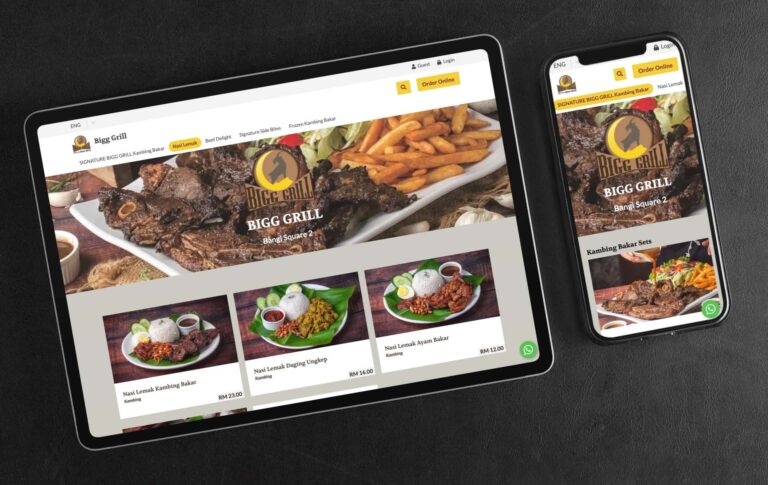
Most online food ordering platforms rely on small and eye-squinting images that don’t do justice to the food being sold. This lack of engaging visuals is a significant reason why visitors often leave those sites without making a purchase, ultimately impacting restaurant sales conversions. If you cannot visually captivate visitors in a few seconds, you have lost them and the ROI on your ad spend. At FoodVillage, we understand the importance of stunning food photography in converting visitors into customers. That’s why we offer an option to display your food photos in a large format that will truly engage your visitors and make them want to buy. In fact, studies have shown that captivating visuals are a critical component in optimising online sales conversions. So whatever digital device a customer uses, you can be assured that they will be presented with a large image format that truly represents the best possible culinary visual experience that can trigger the response you’d like from your customers. Even if they are not ready to buy, you have already left a lasting impression that would cause them to share that experience or bookmark it so that they can make the purchase another time. Here are several advantages to using large images in restaurant digital menus: 1. Improved Visual Appeal Large images can make a restaurant’s digital menu more visually appealing and attractive to customers. When customers are deciding what to order, they often rely on visual cues to help them make their decision. Large, high-quality images of menu items can help customers visualize what they will be eating and may encourage them to try something new. 2. Easier To See By using large images, restaurants can make it easier for customers to see the details of their menu items and make informed decisions about what to order. Large images can be easier for customers with visual impairments or for those using small screens on their phones. 3. Enhanced Marketing Large images can be used as a marketing tool to showcase a restaurant’s most popular or unique menu items. By highlighting these items with large, eye-catching images, restaurants can draw attention to them and encourage customers to try them. 4. Improved Customer Experience Using large images in a digital menu can improve the overall customer experience by making it easier for customers to browse and order from the menu. When customers have a positive experience with a restaurant’s digital menu, they are more likely to return and recommend the restaurant to others. 5. Increased efficiency Large images can also help to increase efficiency in the ordering process. By using images to clearly display menu items and prices, restaurants can reduce the time it takes for customers to make their selections and place their orders. This can help to reduce wait times and improve the overall efficiency of the restaurant. Here is another example of a client who is capitalising on powerful imagery to convert visitors into paying customers: Contact us today and let us show you how you can get started selling online as quickly as a day. We’ll even provide a free consultation to discuss the best way to showcase your food photos on your web store using our platform.

Read More »
Restaurant digital menu

10 Amazing Benefits Of Using Digital Menus For Restaurants

In today’s digital age, customers expect to be able to order food from their smartphones with the touch of a button. A digital menu can help your restaurant keep up with the latest trends and satisfy your customers’ desires. With our digital menus, you can customize your orders according to each customer’s preference, and say goodbye to human errors!  We personally witnessed the benefits of digital menus in one of our client’s outlets. In this situation, it was a lunch crowd with patrons occupying eight tables and simultaneously deciding what to order. At one of those tables, eleven patrons who had just walked in, scanned the table-specific QR code to place their orders within a short space of time. No waiter was in sight nor were they needed. Within a minute or two, order after order came scrolling out of the merchant’s thermal printer. Here are the benefits we noticed from this experience: 1. Digital Menus Improves Service Speed With digital menus, customers can place their orders immediately. There was no need to flag a waiter for service which can be an absolute nightmare during peak hours or there is a non-observant waiter, not forgetting as well when patrons are seated in an obscure location in the restaurant. Customers can choose to place paid orders ahead of time so they are ready to eat the moment they are seated. 2. Serve More Customers When customers are served faster, you will be able to serve more customers with the same amount of dining space. Reduce the number of times you turn away customers because you could no longer accommodate them. 3. Digital Menus Eliminate Human Error We are all too familiar with waiters getting our orders wrong. With digital menus, the customer is the one that is placing the order and each order is printed. Reference can be made to the printout if the accuracy of the order is in question. Another common sight at restaurants is a waiter with his hands full with orders scrambling up and down between tables wondering who placed the order. 4. Swift Menu Changes Ever tried after taking some time deciding on an order only to find out when you finally get the attention of a waiter that the item is not available? We all know how inconvenient that is. With a digital menu, menu managers can hide or place items out of stock with a simple few clicks. Changes to the menu can be made quickly and reflected on the front end. This includes changes in prices or adding and removing items. Try doing this at the same speed and cost with printed menus. 5. Personalised Service With digital menus, waiters will not only know what is ordered and which table the order came from but the customer’s name. Imagine how special a customer would feel if they received their order while being addressed by name. Should this feature not fit into your business model, simply turn off the option to capture customers’ info for dine-in orders. The image on the right is a glimpse of the order dashboard of our system with a summary of the actual order received from the eleven patrons. Order managers can click on any order and view the order details, create another order printout if needed and move orders to the completed order status when a customer has finally paid. 6. Order History For Easy Reordering Customers who log in when they order will find an order history whenever they order and they can reorder the same order with a few simple clicks. 7. Capturing Data Analytics Many restaurants are still driving their businesses blind, with the FoodVillage digital dine-in menu every single order is captured and displayed beautifully to empower you to understand customer behaviour. From the top-selling products, the payment type, peak hours, customer’s total spend and the number of orders and much more. Learn more from our article: How You Can Benefit From FoodVillage’s Detailed Sales Data Analytics 8. Waiters Are Freed Up To Focus On Order Fulfilment With digital menus, say goodbye to the time it takes to jot down an order. The time saved can be used to focus on the delivery of orders. This also means cost savings from the additional staff that won’t be required during peak hours or seasons. It’s no wonder in Japan, restaurants can operate without any waiters. Worried about upsells without a waiter? Structure the upsells right into your menu so you are guaranteed that customers are receiving upsells every single time. Customers get a better deal and you increase your revenues! 9. Immediate And Designated Order Printouts Every single order if you so choose get printed and with specific dishes printed to designated stations. For example, drink orders would be sent with only printouts of drinks sent to the drink station while the complete order is sent to the front of house. 10. A Better System While Lowering Cost With FoodVillage’s digital menus, the cost savings are obvious. For a fraction of the cost of hiring one waiter, you will now have a virtual waiter at every single table that is ready ALL the time, makes no errors, collects payments, upsells customers, registers customer data, records order data for analytics, prints out orders while organising each order systematically, doesn’t get tired nor complains and doesn’t ask for a raise. But wait, it gets even better! We have only addressed the dine-in benefits. With no additional cost, you get pickups, deliveries and table reservations on one platform! It’s no wonder why McDonald’s now uses digital menus as well as table QR ordering. Other fast-food joints have taken notice and are already jumping on the bandwagon. Times have changed, don’t get left behind. Better yet, you don’t have to spend millions on hardware and software with FoodVillage. Eliminate the number of lost customers who avoided eating at your restaurant just because another restaurant could process their orders much faster. Imagine what a simple change could do to your

Read More »
Need Help?